
In today’s world, laptops are everywhere. Whether you are a student attending online classes, a professional working from home, a freelancer building your career, or someone just browsing the internet, chances are you spend hours each day in front of a laptop. While laptops bring convenience and flexibility, they also come with a hidden problem that most people ignore until it becomes painful: poor posture.
Bad laptop posture can slowly lead to neck pain, back pain, shoulder stiffness, eye strain, and even long-term musculoskeletal issues. The good news is that these problems are completely preventable. With the right knowledge and small adjustments, you can protect your body and improve your comfort, focus, and productivity. This detailed guide will walk you through everything you need to know about proper laptop posture, ergonomic setup, desk positioning, chair selection, and healthy habits that reduce strain.
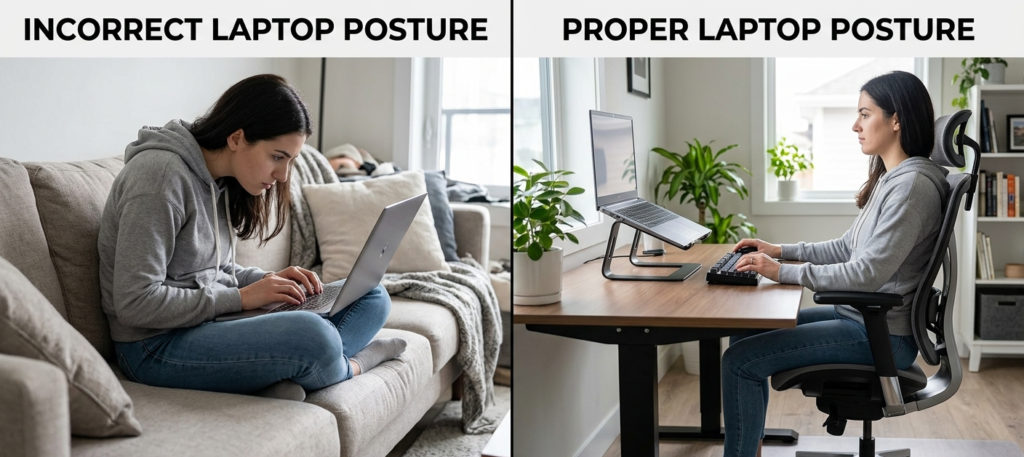
Why Proper Laptop Posture Matters
Let’s start with a simple truth: laptops are not ergonomically perfect by design. Unlike desktop setups, where you can adjust the monitor, keyboard, and mouse separately, laptops combine everything into one flat device. This forces your body into unnatural positions if you are not careful. Some common problems caused by poor laptop posture include:
- Neck pain from looking down for long hours
- Upper and lower back pain
- Shoulder stiffness and tension
- Wrist pain and repetitive strain injury
- Eye strain and headaches
- Reduced concentration and productivity
Proper posture is not just about comfort. It is about long-term health and preventing chronic pain conditions that can affect your daily life and work performance.
Understanding Proper Laptop Posture
Before fixing posture, you need to understand what correct posture actually looks like. A proper laptop posture means your body is aligned in a neutral position where no muscle is overworked or strained. Here is what ideal posture looks like:
- Your head is straight, not tilted forward or downward
- Your ears are aligned with your shoulders
- Your shoulders are relaxed, not hunched
- Your back is supported and naturally straight
- Your elbows are bent at about 90 degrees
- Your wrists are straight, not bent up or down
- Your feet are flat on the floor
If you are thinking, “this sounds hard to maintain,” you are right. That is why ergonomic adjustments are important.
The Ideal Laptop Setup for Better Posture
A proper ergonomic laptop setup is the foundation of good posture. Let’s break it down step by step.
1. Screen Height Matters
One of the biggest mistakes people make is placing the laptop directly on a desk or lap. This forces you to look down, which strains your neck.
- The ideal screen height is: Top of the screen at eye level, you should look straight ahead, not down or up.
- To achieve this, you can use: A laptop stand, a stack of books and an adjustable monitor riser
2. Use an External Keyboard and Mouse
Once your laptop is raised, you cannot type comfortably on it anymore. That is where external accessories come in. An ergonomic setup includes:
- External keyboard placed at elbow height
- External mouse positioned close to the keyboard
This allows your arms to stay relaxed and prevents wrist strain.
3. Chair Position and Support
Your chair plays a major role in laptop posture correction. A good chair should support your lower back (lumbar support), allow your feet to rest flat on the floor, keep your knees at a 90-degree angle and let your back stay upright without slouching. If your chair is too low or too high, your posture will suffer no matter how well your laptop setup is.
4. Desk Height Alignment
Your desk should allow your elbows to rest naturally at a 90-degree angle. If the desk is too high, your shoulders will lift and cause tension. If it is too low, you will slouch forward. A proper desk setup ensures:
- Forearms are parallel to the ground
- Wrists remain straight
- Shoulders stay relaxed
Common Laptop Posture Mistakes
Many people unknowingly develop bad habits while using laptops. Here are the most common mistakes:
- Looking Down for Long Periods: This is known as “tech neck” or “text neck.” It puts excessive strain on your cervical spine.
- Slouching Forward: Slouching compresses your spine and leads to long-term back pain.
- Using Laptop on Bed or Couch: This is one of the worst habits. It encourages poor spine alignment and reduces circulation.
- Improper Wrist Position: Bending wrists while typing can lead to repetitive strain injuries over time.
- Sitting for Too Long without Breaks: Even with perfect sitting posture, sitting for long hours is harmful.
Ergonomic Tips for Better Laptop Posture
Now let’s look at practical and easy improvements you can make today.
- Keep the 90-90-90 Rule in Mind: 90 degrees at hips, 90 degrees at knees and 90 degrees at elbows. This is one of the most recommended ergonomic posture guidelines.
- Follow the 20-20-20 Eye Rule: To reduce eye strain every 20 minutes, look at something 20 feet away for at least 20 seconds. This is widely used in digital eye strain prevention and laptop productivity tips.
- Take Regular Breaks: Set reminders to stand up every 30 to 60 minutes. Even a short walk helps improve blood circulation and reduce stiffness.
- Keep Your Screen at Arm’s Length: Your screen should be about an arm’s length away from your eyes. This reduces eye strain and improves focus.
- Use Proper Lighting: Avoid working in dark rooms or direct glare on the screen. Balanced lighting reduces eye fatigue.
Health Problems Caused by Poor Laptop Posture
Ignoring posture can lead to serious long-term issues. Some of them include:
- Chronic neck pain
- Herniated discs
- Shoulder impingement
- Carpal tunnel syndrome
- Chronic headaches
- Poor circulation
- Reduced lung capacity due to slouching
Best Practices for Students and Remote Workers
If you are studying or working from home, here are some additional tips:
- Create a dedicated workspace
- Avoid working from bed
- Invest in basic ergonomic tools like laptop stand and chair support
- Keep your workspace clutter free
- Maintain consistent posture habits
These small changes can significantly improve your daily comfort and productivity.
Exercises to Improve Laptop Posture
Along with ergonomic setup, exercises can help reverse damage from poor posture.
- Neck stretches: Gently tilt your head side to side and hold for a few seconds.
- Shoulder rolls: Roll your shoulders backward and forward to release tension.
- Back extensions: Stand and gently lean backward to stretch your spine.
- Wrist stretches: Extend your arm and gently pull your fingers back.
Building Long-Term Healthy Laptop Habits
Fixing posture is not a one-time solution. It is a habit you build over time. Here is how to make it stick:
- Set posture reminders on your phone
- Adjust your setup instead of adjusting your body
- Practice mindfulness while sitting
- Check your posture every 10 to 15 minutes
- Invest in ergonomic tools if you work long hours
Laptop Posture and Usage Statistics (Important Data Table)
Here is a helpful stats table that highlights key facts about laptop usage, posture problems, and digital health issues. These numbers help show why proper laptop posture is not just optional but necessary for long-term health.
| Category | Statistic | What It Means |
| Neck Pain Prevalence | Around 70% of laptop and computer users report neck pain at some point | Poor screen height and forward head posture are major causes |
| Back Pain Cases | Nearly 60% of office workers experience lower back pain | Long sitting hours without support contribute heavily |
| Daily Screen Time | Average person spends 6 to 9 hours daily on screens | High exposure increases risk of posture-related strain |
| Eye Strain Reports | About 50% to 90% of computer users report eye strain symptoms | Caused by long screen exposure and poor lighting |
| Productivity Drop | Poor posture can reduce focus and productivity by up to 20% | Discomfort directly affects concentration and work efficiency |
| Break Frequency Impact | Taking breaks every 30 to 60 minutes reduces muscle fatigue significantly | Small breaks help reset posture and reduce stiffness |
| Ergonomic Setup Benefit | Proper ergonomic setup can reduce musculoskeletal pain by up to 40% | Shows how effective correct laptop positioning can be |
Final Thoughts
Proper laptop posture is essential for anyone who uses a computer regularly. Whether you are working, studying, gaming, or browsing, your body deserves support and care. By making simple changes like adjusting screen height, using an external keyboard, maintaining a neutral spine, and taking regular breaks, you can prevent pain and improve your overall quality of life. The key takeaway is simple: your laptop should adapt to your body, not the other way around. Start improving your posture today, and your future self will thank you.
FAQs:
1. What is the correct posture when using a laptop?
The correct posture is sitting with your back straight, shoulders relaxed, feet flat on the floor, elbows at 90 degrees, and the top of your screen at eye level.
2. How can I fix my posture while using a laptop?
You can fix your posture by raising your laptop to eye level, using an external keyboard and mouse, sitting in an ergonomic chair, and taking regular breaks to stretch.
3. Is using a laptop on the bed bad for posture?
Yes, using a laptop on the bed usually leads to poor posture, neck strain, and back pain because your body is not properly supported or aligned.
4. How often should I take breaks from the laptop?
You should take a short break every 30 to 60 minutes to stand, stretch, and rest your eyes to reduce strain and improve circulation.
5. Can poor laptop posture cause long-term damage?
Yes, long-term poor posture can lead to chronic neck pain, back problems, wrist strain, and other musculoskeletal issues if not corrected early.
