
In today’s world, most people spend a huge part of their day sitting at a desk. Whether you work from home, in an office, or even study long hours, your workspace has a direct impact on your health, productivity, and energy levels. Unfortunately, many people ignore how their desk is set up until they start feeling discomfort, stiffness, or even chronic pain.
This is where an ergonomic desk setup for better health becomes essential. Ergonomics is all about designing your workspace so that it fits your body instead of forcing your body to adapt to it. A properly optimized setup can reduce back pain, prevent neck strain, improve posture, and even boost your focus and efficiency. In this detailed guide, we will break down everything you need to know about creating a healthy, comfortable, and productive desk setup.
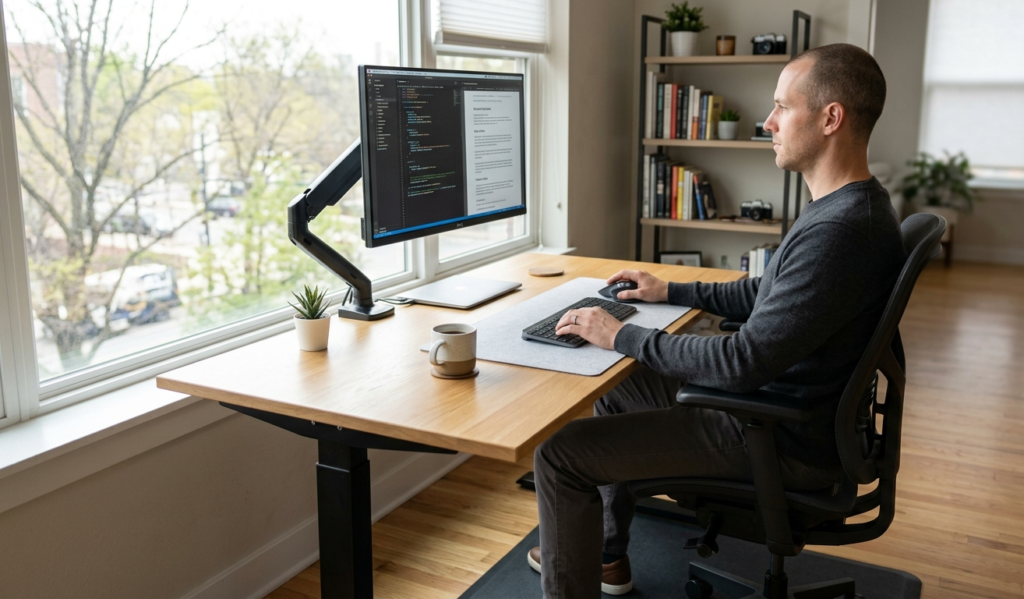
Why Ergonomic Desk Setup Matters for Your Health
A poor desk setup is more harmful than most people realize. Sitting incorrectly for long hours can cause chronic back pain, neck stiffness, shoulder tension, eye strain, headaches, poor circulation, reduced productivity and long-term musculoskeletal issues. When your body is not properly supported, muscles work harder than they should. Over time, this leads to fatigue and discomfort.
On the other hand, a well-designed ergonomic desk setup helps you to maintain a natural posture, reduce physical strain, improve breathing and circulation, stay focused for longer periods, avoid repetitive strain injuries and increase overall comfort while working. In short, ergonomics is not a luxury. It is a long-term investment in your health.
The Foundation of an Ergonomic Desk Setup
Before diving into accessories or gadgets, it is important to understand the basic structure of a healthy workstation. An ideal ergonomic setup includes:
- A properly adjusted chair
- A desk at the correct height
- A monitor positioned at eye level
- A keyboard and mouse placed correctly
- Good lighting
- Proper sitting posture habits
Let’s explore each in detail.
1. Choosing the Right Ergonomic Chair
Your chair is the most important part of your setup. A bad chair can ruin even the most expensive desk arrangement.
Key features of a good ergonomic chair:
- Adjustable height
- Lumbar (lower back) support
- Adjustable armrests
- Comfortable cushioning
- Ability to recline slightly
- Breathable material
Correct sitting posture in an ergonomic chair: Feet should be flat on the floor. Knees should be at a 90-degree angle. Back should be fully supported by the chair. Shoulders should remain relaxed. Avoid slouching or leaning forward. If your feet do not reach the floor, consider using a footrest.
2. Desk Height and Positioning
The height of your desk plays a major role in preventing strain.
Ideal desk height guidelines:
- When sitting, your elbows should be at a 90-degree angle while typing
- Your forearms should be parallel to the floor
- Your wrists should remain straight, not bent up or down
- If your desk is too high, it can cause shoulder tension. If it is too low, it can lead to slouching and back pain.
Standing desks option: Many people now prefer adjustable standing desks. These allow you to switch between sitting and standing, which improves circulation and reduces fatigue.
3. Monitor Placement for Eye and Neck Health
One of the most common mistakes people make is placing their monitor too low or too close.
Correct monitor positioning: Top of the screen should be at or slightly below eye level. Screen should be about an arm’s length away. Tilt the screen slightly upward if needed. Keep it centered directly in front of you.
Benefits:
- Reduces neck strain
- Prevents forward head posture
- Minimizes eye fatigue
- Improves focus and comfort
If you use multiple monitors, place the primary screen directly in front of you and the secondary screen slightly to the side.
4. Keyboard and Mouse Placement
Improper positioning of your keyboard and mouse can lead to wrist pain and repetitive strain injuries.
Best ergonomic setup: Keyboard should be directly in front of you. Mouse should be close to the keyboard. Wrists should remain straight and relaxed. Avoid bending wrists upward while typing. Consider using a wrist rest if needed.
Ergonomic tip: Keep your mouse and keyboard at the same level as your elbows. This reduces unnecessary tension in your arms and shoulders.
5. Proper Lighting for Eye Comfort
Lighting is often ignored, but it plays a huge role in reducing eye strain.
Best lighting practices: Use natural light whenever possible. Avoid sitting directly in front of a bright window. Use soft, adjustable desk lamps. Avoid glare on your screen. Position light sources to the side of your monitor. Poor lighting can cause headaches, blurry vision, and fatigue, especially during long working hours.
6. Posture Habits That Make a Big Difference
Even with the best setup, poor habits can still cause discomfort.
Healthy posture habits include: Sitting upright with back supported. Keeping shoulders relaxed. Avoiding crossing legs for long periods. Taking breaks every 30 to 60 minutes. Stretching regularly. Standing up and moving around during breaks
The 20-20-20 rule for eye health: Every 20 minutes, look at something 20 feet away for at least 20 seconds. This reduces eye strain significantly.
7. Accessories That Improve Ergonomics
While not mandatory, certain accessories can improve your setup significantly.
Useful ergonomic accessories:
- Monitor riser or adjustable arm
- Ergonomic keyboard
- Vertical mouse
- Footrest
- Laptop stand
- Anti-fatigue mat (for standing desks)
- Cable management tools
These small additions can dramatically improve comfort and reduce strain.
8. Ergonomic Setup for Laptop Users
If you use a laptop, you are more likely to develop poor posture because screens are naturally low.
Recommended setup for laptops: Use a laptop stand to raise screen height. Connect an external keyboard and mouse. Use an external monitor if possible. Maintain proper eye level alignment. This setup prevents “tech neck”, a common issue among laptop users.
9. Home Office Ergonomics Tips
Working from home has become extremely common, but not all home setups are ergonomic.
Home office optimization tips:
- Choose a quiet, distraction-free area
- Invest in a proper chair and desk
- Maintain a dedicated workspace
- Avoid working from bed or sofa
- Keep your desk organized and clutter-free
- Use noise control tools if needed
A dedicated workspace improves both productivity and mental clarity.
10. Common Ergonomic Mistakes to Avoid
Many people unknowingly make mistakes that harm their posture and health.
Avoid these mistakes:
- Sitting too long without breaks
- Slouching forward
- Placing monitor too low
- Using non-adjustable chairs
- Keeping keyboard too far away
- Ignoring wrist position
- Poor lighting setup
Awareness is the first step toward improvement.
11. Benefits of a Proper Ergonomic Desk Setup
Once you make the switch to an ergonomic workspace, the benefits are noticeable quickly.
Health benefits:
- Reduced back and neck pain
- Better posture
- Less eye strain
- Improved circulation
- Lower risk of long-term injuries
Productivity benefits:
- Better focus
- Increased energy levels
- Reduced fatigue
- Fewer distractions caused by discomfort
Lifestyle benefits:
- Better work-life balance
- Improved comfort during long work hours
- Enhanced overall well-being
Ergonomic Desk Setup Statistics and Health Impact
Ergonomic desk Setup statistics and its health Impact is given as below:
| Category | Statistic | What It Means |
| Sitting Time | Average office worker sits 6 to 8 hours daily | Long sitting hours increase risk of back pain and poor posture |
| Back Pain | Around 80% of people experience back pain at some point | Poor desk setup is a major contributing factor |
| Productivity | Ergonomic improvements can boost productivity by up to 15% | Comfortable workers focus better and work more efficiently |
| Musculoskeletal Issues | Over 50% of desk workers report neck or shoulder pain | Incorrect monitor and chair setup are common causes |
| Eye Strain | About 60% to 70% of computer users experience digital eye strain | Poor lighting and screen positioning play a big role |
| Break Habits | Only 1 in 3 workers take regular breaks | Lack of movement leads to stiffness and fatigue |
| Posture Awareness | Less than 30% of people maintain proper sitting posture | Most people are unaware of correct ergonomics |
| Standing Desk Use | Standing desks can reduce back pain by up to 32% | Alternating between sitting and standing improves health |
| Workplace Injuries | Repetitive strain injuries account for a large portion of office-related issues | Poor keyboard and mouse positioning are key factors |
| Work From Home Impact | Over 70% of remote workers report discomfort due to poor setups | Home offices often lack ergonomic design |
Final Thoughts: Build a Workspace That Supports You
An ergonomic desk setup for better health is not just about comfort, it is about protecting your body from long-term damage while improving your daily performance. You do not need to buy everything at once. Start with small improvements like adjusting your chair, repositioning your monitor, and fixing your posture. Over time, upgrade your workspace with better tools and accessories. Your body spends hours in your workspace every day, so it deserves proper support. A well-designed ergonomic setup will not only help you feel better physically but also improve your focus, productivity, and overall quality of life. If you are serious about working efficiently without pain, investing time in ergonomics is one of the smartest decisions you can make.
FAQs:
1. What is an ergonomic desk setup?
An ergonomic desk setup is a workspace arranged to support your body posture, reduce strain, and improve comfort while working. It focuses on proper chair height, monitor position, and keyboard placement.
2. How do I know if my desk setup is not ergonomic?
Common signs include back pain, neck stiffness, shoulder tension, wrist discomfort, or frequent headaches after working for long hours.
3. What is the correct monitor height for good posture?
Your monitor should be at eye level, or slightly below, so you do not need to tilt your head up or down while working.
4. Can an ergonomic chair really reduce back pain?
Yes, a good ergonomic chair with lumbar support helps maintain natural spine alignment, which can significantly reduce lower back pain over time.
5. How often should I take breaks while working at a desk?
It is recommended to take a short break every 30 to 60 minutes to stand, stretch, and reduce stiffness from prolonged sitting.
