
If you spend long hours at a desk, your sitting posture is not just about looking professional. It directly affects your health, energy levels, and even your long term well-being. Many office workers struggle with back pain, neck stiffness, poor circulation, and fatigue, often without realizing that the root cause is poor posture.
This detailed guide will walk you through everything you need to know about correct sitting posture for office workers, including practical tips, ergonomic setup advice, and small habits that can make a big difference. Whether you work from home or in a corporate office, these strategies will help you stay comfortable, focused, and pain free.
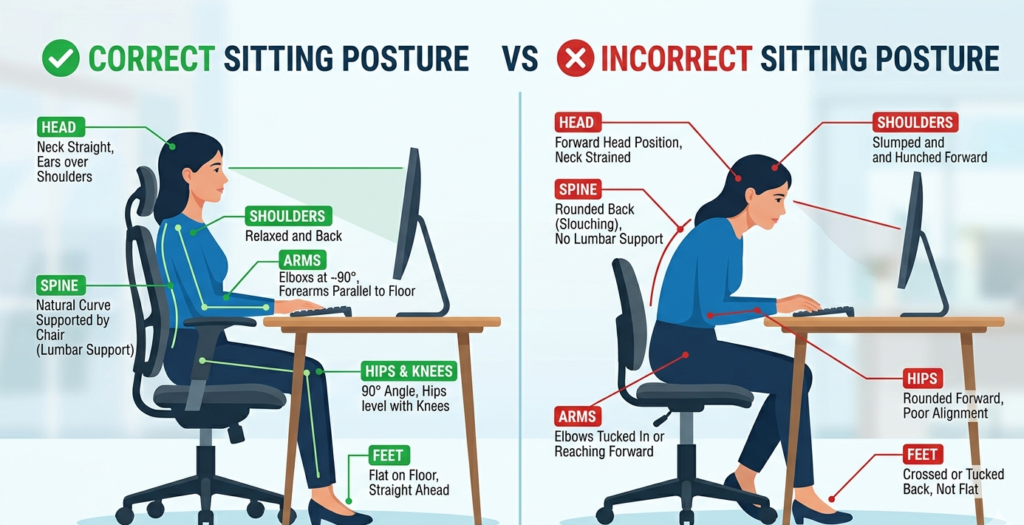
Why Correct Sitting Posture Matters
Before jumping into how to sit properly, it helps to understand why posture is so important. Poor sitting posture can lead to chronic lower back pain, neck and shoulder tension, reduced blood circulation, fatigue and reduced productivity and long term spinal issues. On the other hand, good posture supports your spine naturally, reduces muscle strain, improves breathing and focus, and boosts productivity and comfort.
The Ideal Sitting Posture Explained
Let’s break down what correct sitting posture actually looks like.
1. Keep Your Back Straight and Supported
Your spine should maintain its natural curve. Avoid slouching or leaning forward.. Sit with your back fully against the chair. Use lumbar support to maintain the curve in your lower back. Avoid rounding your shoulders. If your chair does not provide support, consider using a small cushion or lumbar roll.
2. Keep Your Feet Flat on the Floor
Your feet play a bigger role than you might think. Keep both feet flat on the ground. Avoid crossing your legs for long periods. Use a footrest if your feet do not reach the floor. This helps maintain proper alignment and improves circulation.
3. Adjust Your Chair Height Properly
Chair height is critical for ergonomic sitting posture. Your knees should be at or slightly below hip level. Thighs should be parallel to the floor. Elbows should align with desk height Many people look up “correct chair height for desk work”, and this is the simple rule to follow.
4. Position Your Monitor at Eye Level
Neck pain is one of the most common complaints among office workers. The top of your screen should be at or slightly below eye level. Keep the monitor about an arm’s length away. Avoid looking down or tilting your head upward. This reduces strain on your neck and upper back.
5. Keep Your Shoulders Relaxed
Tension often builds in the shoulders without you noticing. Let your shoulders stay relaxed, not raised. Keep elbows close to your body. Maintain a 90 degree angle at your elbows. This is key for those who want to learn how to reduce shoulder pain from desk job.
6. Keep Wrists in a Neutral Position
Typing posture matters just as much as sitting posture. Keep wrists straight, not bent upward or downward. Use a soft wrist rest if needed. Avoid resting wrists on hard surfaces for long periods. This helps prevent repetitive strain injuries like carpal tunnel syndrome.
Common Sitting Posture Mistakes to Avoid
Even if you try to sit properly, small habits can ruin your posture.
- Slouching Forward: This puts pressure on your spine and leads to back pain.
- Leaning on One Side: Uneven weight distribution causes muscle imbalance.
- Sitting Too Long Without Movement: Even perfect posture becomes harmful if you stay still for hours.
- Looking Down at Your Laptop: This is a major cause of “tech neck”.
If you recognize these habits, you are not alone. Many office workers struggle with them daily.
Best Ergonomic Setup for Office Workers
Creating an ergonomic workstation is essential for maintaining correct posture.
- Chair: Adjustable height, lumbar support and comfortable cushioning
- Desk: Elbow height when seated and enough space for movement
- Monitor: Eye level positioning and proper distance from your face
- Keyboard and Mouse: Close enough to avoid reaching and at the same height as your elbows
How Long Should You Sit?
Even with perfect posture, sitting too long is harmful. Experts recommend:
- Take a break every 30 to 60 minutes
- Stand, stretch, or walk for a few minutes
- Change positions throughout the day
This is often called the “sit stand balance” approach.
Simple Exercises to Improve Sitting Posture
Improving posture is not just about how you sit, but also about strengthening your body.
- Shoulder Rolls: Roll shoulders forward and backward that relieves tension
- Neck Stretch: Gently tilt your head side to side that reduces stiffness
- Seated Spinal Twist: Rotate your torso while seated that improves flexibility
- Chest Stretch: Open your arms wide that counters slouching posture
Tips for Maintaining Good Posture All Day
Knowing the correct posture is one thing. Maintaining it is another. Here are some practical tips:
- Set Reminders: Use your phone or apps to remind you to check your posture.
- Use a Posture Corrector: Temporary use can help build awareness.
- Stay Active: Regular exercise strengthens your core and back muscles.
- Adjust Your Workspace Regularly: Small changes can improve comfort significantly.
- Practice Mindfulness: Simply being aware of how you sit makes a huge difference.
Work from Home Posture Tips
Remote work has made posture problems even more common.
- Avoid Working from Bed: This destroys posture and leads to long term issues.
- Use a Proper Chair: Dining chairs are not ideal for long hours.
- Elevate Your Laptop: Use books or a stand to bring it to eye level.
- Create a Dedicated Workspace: This helps maintain consistency in posture habits.
Long Term Benefits of Good Sitting Posture
Improving your sitting posture is not just about immediate comfort. Over time, you will notice less back and neck pain, better concentration, improved mood and energy, reduced risk of chronic conditions and good posture is an investment in your health.
Sitting Posture Statistics and Insights for Office Workers
To better understand how important correct sitting posture is, here is a data driven overview based on widely reported workplace health research. These insights highlight why improving posture and ergonomics should be a priority for every office worker.
| Category | Statistic | What It Means for You |
| Office workers with back pain | Around 60 to 80 percent | A large majority of desk workers experience back pain at some point due to poor posture and prolonged sitting |
| Time spent sitting daily | 6 to 10 hours on average | Most office jobs require extended sitting, increasing the risk of posture related problems |
| Neck pain prevalence | About 45 percent of office workers | Improper monitor height and forward head posture are major causes |
| Productivity loss due to discomfort | Up to 20 percent decrease | Poor posture can reduce focus, efficiency, and overall work output |
| Improvement with ergonomic setup | Up to 50 percent reduction in discomfort | Proper chair, desk, and monitor setup significantly reduces pain |
| Break frequency recommendation | Every 30 to 60 minutes | Regular movement helps prevent stiffness and improves circulation |
| Work from home posture issues | Over 70 percent report worse posture | Lack of proper office setup at home contributes to poor habits |
| Musculoskeletal disorders | Affect nearly 1 in 3 office workers | Long term poor posture can lead to chronic conditions |
| Standing or movement benefits | Can reduce back pain by up to 30 percent | Alternating between sitting and standing improves spinal health |
Final Thoughts
Correct sitting posture for office workers is one of the simplest yet most powerful ways to improve your daily life. Small adjustments to how you sit, how your desk is set up, and how often you move can prevent serious health issues and boost your productivity. If you have been dealing with discomfort, fatigue, or stiffness, your posture might be the missing piece. Start with small changes today, stay consistent, and your body will thank you.
FAQs:
1. What is the correct sitting posture for office workers?
The correct sitting posture includes keeping your back straight with proper lumbar support, feet flat on the floor, and knees at hip level, shoulders relaxed, and your screen at eye level. This helps reduce strain on your spine and muscles.
2. How can I fix my posture while sitting at a desk?
Start by adjusting your chair height, aligning your monitor to eye level, and keeping your back supported. Take regular breaks, stretch often, and stay mindful of slouching. Small consistent corrections make a big difference over time.
3. Is it bad to sit for long hours even with good posture?
Yes, sitting for long periods is still harmful even if your posture is correct. It is important to stand, stretch, or walk every 30 to 60 minutes to improve circulation and reduce stiffness.
4. What are the signs of poor sitting posture?
Common signs include back pain, neck stiffness, shoulder tension, headaches, and fatigue. If you notice yourself slouching or leaning forward often, your posture likely needs improvement.
5. What is the best chair for maintaining good posture?
An ergonomic chair with adjustable height, lumbar support, and proper cushioning is ideal. It should support the natural curve of your spine and allow your feet to rest flat on the floor.
